Migrating a Contractor's CRM Without Losing Pipeline History
Preserve pipeline history and deal context when switching contractor CRM platforms.
Migrating a contractor's CRM is a data-integrity problem wearing a software costume. Contractors who treat it as "switching tools" lose pipeline history, orphan deals mid-quote, and rebuild months of follow-up work by hand. The ones who get it right treat the move as a sequence: audit first, export deliberately, run both systems in parallel, verify everything, and only then cancel the old subscription.
That sequence matters because contractor CRM data isn't just a phone book. It's the record of every bid stage, every callback, every job that closed and every one that didn't, and that history is what future quoting and conversion rates get built on. Per Gartner, cited in thehigherpitch.com, over 60% of B2B companies plan to switch or upgrade their CRM platform by 2026, and the trades are squarely inside that wave. The same source reports that more than half of those migrations get delayed or derailed by poor data quality, weak planning, or complexity nobody accounted for going in. And per move.dlhnunukan.org (May 2026), 38% of migrating companies reported "significant data loss," things like missing tags, dead automations, and orphaned deals.
For a hardscape contractor, an orphaned deal isn't an abstraction. It's a $25,000 patio job that was mid-quote when the migration happened, now sitting in the new system with no follow-up history attached. The rep either starts from scratch or loses the job.
Per Patoliya Infotech (July 2026), five categories of data have to survive the move intact: pipeline stage and deal history (the stage progression that feeds win-rate reporting, not just the current stage), custom fields (deal source, project type, renewal date, almost never a clean match in a new system), attachments and documents (proposals and contracts, frequently skipped because they're harder to script than database fields), automation logic (workflows and scoring rules that don't move on their own and have to be rebuilt), and user permissions and ownership (who owns which record, and who can see what).
What triggers a contractor CRM migration and why the timing creates extra risk
Most contractors don't wake up one day wanting a new CRM. Something forces it.
A spreadsheet or entry-level tool stops holding up once bid volume climbs. A second system gets added for marketing or scheduling, and now three or more disconnected tools are running side by side, a pattern thehigherpitch.com flags as increasingly common in the trades. Sometimes it's cost: a vendor raises prices or a competitor's platform does more for less. Sometimes it's a missing feature. And increasingly, it's AI.
That last driver deserves a closer look. Per Kixie, cited in The Higher Pitch (June 2026), 65% of businesses have already adopted CRM systems with generative AI built in, and those businesses are 83% more likely to exceed their sales goals. There's a hard technical reason for that gap, too: systems built 10 to 15 years ago are, per Wezom (January 2026), physically incapable of processing AI algorithms and the volume of data modern AI features need. Systems built 10 to 15 years ago being physically incapable of processing AI algorithms and modern AI data volumes gives the case for moving concrete weight. So is the case for moving carefully, and those two things don't cancel each other out.
Contractor-specific platforms, Jobber, Housecall Pro, ServiceTitan, FieldEdge, GoHighLevel, each handle export a little differently. All of them offer CSV export from settings or reports, per PipelineOn, but some require a support ticket just to get photos and attachments out. That detail becomes important fast once the audit stage starts.
Migrations get triggered by frustration with the old system, and the timing problem this creates is the one that causes most of the damage. Frustration creates urgency. Urgency makes contractors want to cancel the old platform fast, close the chapter, move on. That's exactly the moment parallel-running discipline breaks down, and it's exactly the moment data gets lost for good.
The trigger doesn't change the process. A cost-driven switch and an AI-readiness switch both require the same audit, the same field mapping, the same parallel period. Nobody gets a shortcut because their reason for leaving felt more urgent than someone else's.
The pre-migration audit: taking inventory before touching anything
Before any record moves anywhere, the data needs a hard look. Per Clearout (November 2025), 88% of sales professionals say they need accurate customer data to do their jobs, so the audit isn't paperwork, it directly shapes whether the new system is usable on day one.
The audit needs to answer a specific set of questions:
Total record volume. Contacts, companies, deals, activities, custom objects. This number shapes both the tool choice and the migration timeline. Data quality. What percentage of records are complete? How many duplicates exist? When was the data last touched? Custom fields. Every one of them, documented: its purpose, how often it gets used, whether it needs to survive the move. Attachments. Proposals, contracts, job-site photos. These need separate handling from database fields, so flag them now rather than discovering the gap later. Automations. Every workflow, sequence, and scoring rule in the current system. None of it moves automatically. All of it has to be rebuilt. Integrations. Scheduling tools, invoicing software, marketing platforms, anything that currently talks to the CRM.
Deduplication belongs here, not after the migration. If the old CRM has three versions of the same homeowner because of years of manual entry, a straight lift-and-shift just copies all three duplicates into the new system, per Patoliya Infotech (July 2026). Match on email, phone number, or domain. Matching on exact name alone misses far more duplicates than it catches, since a name like "Bob Smith" versus "Robert Smith" won't ever flag as the same person.
The output of this whole stage is a written field-mapping document, pairing every field in the old system to its counterpart in the new one. Every later step in the migration runs off this document, so it needs to be built carefully and built first.
One practical note: if a platform requires a support ticket to export photos and signed contracts, submit that request now. Support turnaround on these requests can run several days, and there's no reason to be waiting on it during the actual cutover window.
Exporting cleanly: what each contractor platform actually gives you and what it doesn't
CSV export sounds simple. It isn't complete.
Per PipelineOn, every major contractor platform, Jobber, Housecall Pro, ServiceTitan, FieldEdge, GoHighLevel, offers CSV export from settings or reports. What comes out in that file: contact records, company records, open and closed deals, basic activity logs. That's the good news.
What typically doesn't come out cleanly is the part that actually matters for pipeline continuity. A flat CSV doesn't preserve which contact belongs to which company, or which deals tie back to both. Stage history, the progression a deal made through the pipeline before landing where it is now, frequently requires separate handling beyond a standard CSV pull, even though that history is what feeds win-rate analysis. Activity timelines, calls, emails, meeting notes, live in separate tables that often require extra steps beyond a standard CSV pull. And attachments need their own export process entirely, separate from the database fields.
A custom field in the source system has no match in the target, and this is the silent failure point that costs contractors the most without anyone noticing right away. The migration tool either skips it or dumps it into a generic notes field. Nobody catches this until a rep goes looking for a data point that used to be there, per blog.patoliyainfotech.com, and by then the old system may already be canceled.
Validation needs to happen at the field level after each test batch, not just as a record count. A migration that successfully moved 4,000 records but silently dropped the "project type" field on all of them looks like a success on paper. It's actually a failure, just one that hasn't been discovered yet.
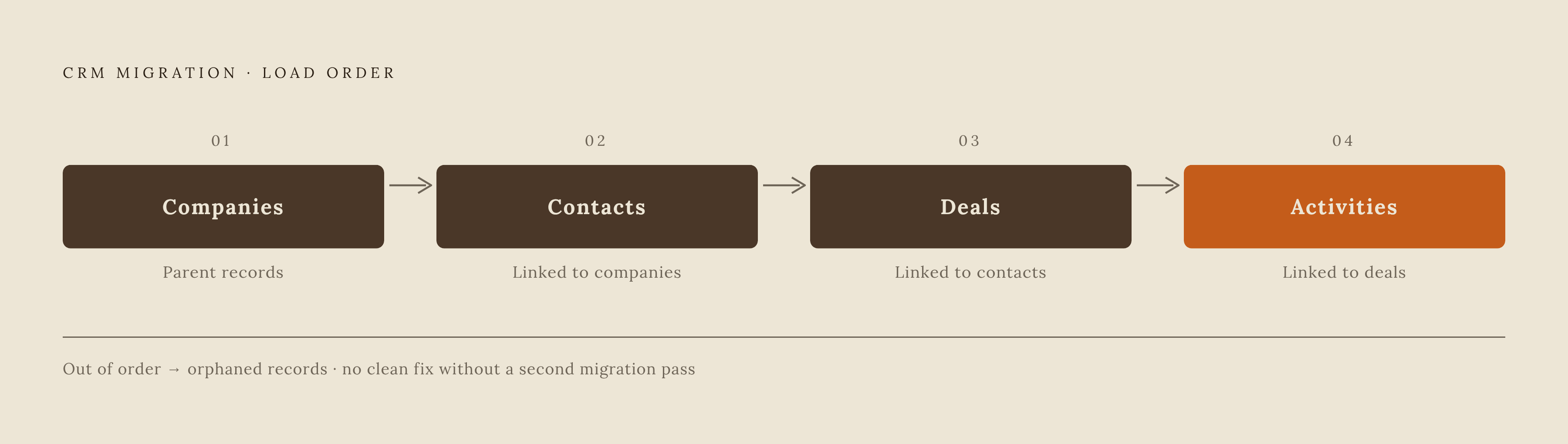
Sequencing matters too. Contacts and companies need to exist in the target system before the deals and activities that reference them get moved in. Per blog.patoliyainfotech.com, getting this order wrong creates orphaned records with no clean way back except a second migration pass. The correct order: companies first, contacts second, deals third, activities last.
Before running the full export, pull one pipeline stage's worth of deals as a test batch. See what survives the trip before committing everything to it.
Field mapping: the document that prevents silent data loss
Custom fields almost never line up one to one between two CRMs. A "deal source" field in the old system might not exist under that name in the new one, might use a different data type, or might have different dropdown options entirely, per Patoliya Infotech (July 2026).
The field-mapping document, built during the audit, needs to carry specific information for every single field:
- Source field name and data type (text, dropdown, date, numeric)
- Target field name and data type
- The transformation rule if the types don't match (a free-text "project budget" field becoming a numeric currency field, for instance)
- A decision for any field with no match: move it into a notes field, build a new custom field in the target, or archive it and leave it behind
- A named person who approved that decision
That last point isn't bureaucratic box-checking. Data integrity needs an owner for each call, so that if a field goes missing three months later, there's a record of who decided to drop it and why.
Pipeline stages deserve their own line of attention here. Stage names and definitions almost never match between systems. "Proposal Sent" in the old CRM might not exist by that name in the new one, and mapping it loosely to something like "Negotiation" quietly changes win-rate reporting after the fact, retroactively, without anyone deciding that should happen. The fix: rebuild the old pipeline's stage structure inside the new CRM before a single deal record gets migrated. Stages have to exist as destinations first.
Per clearout.io, 55% of CRM initiatives fail to meet their intended purpose, and poor data handling during migration is a key contributing factor. For contractors specifically, the fields that go missing most often, and matter most when they do, tend to be those with no direct equivalent in the new system, such as project-specific or location-specific custom fields.
Running parallel systems: the 2–4 week discipline that protects pipeline continuity
This is the step that gets skipped under time pressure, and it's the one with the clearest data behind it.
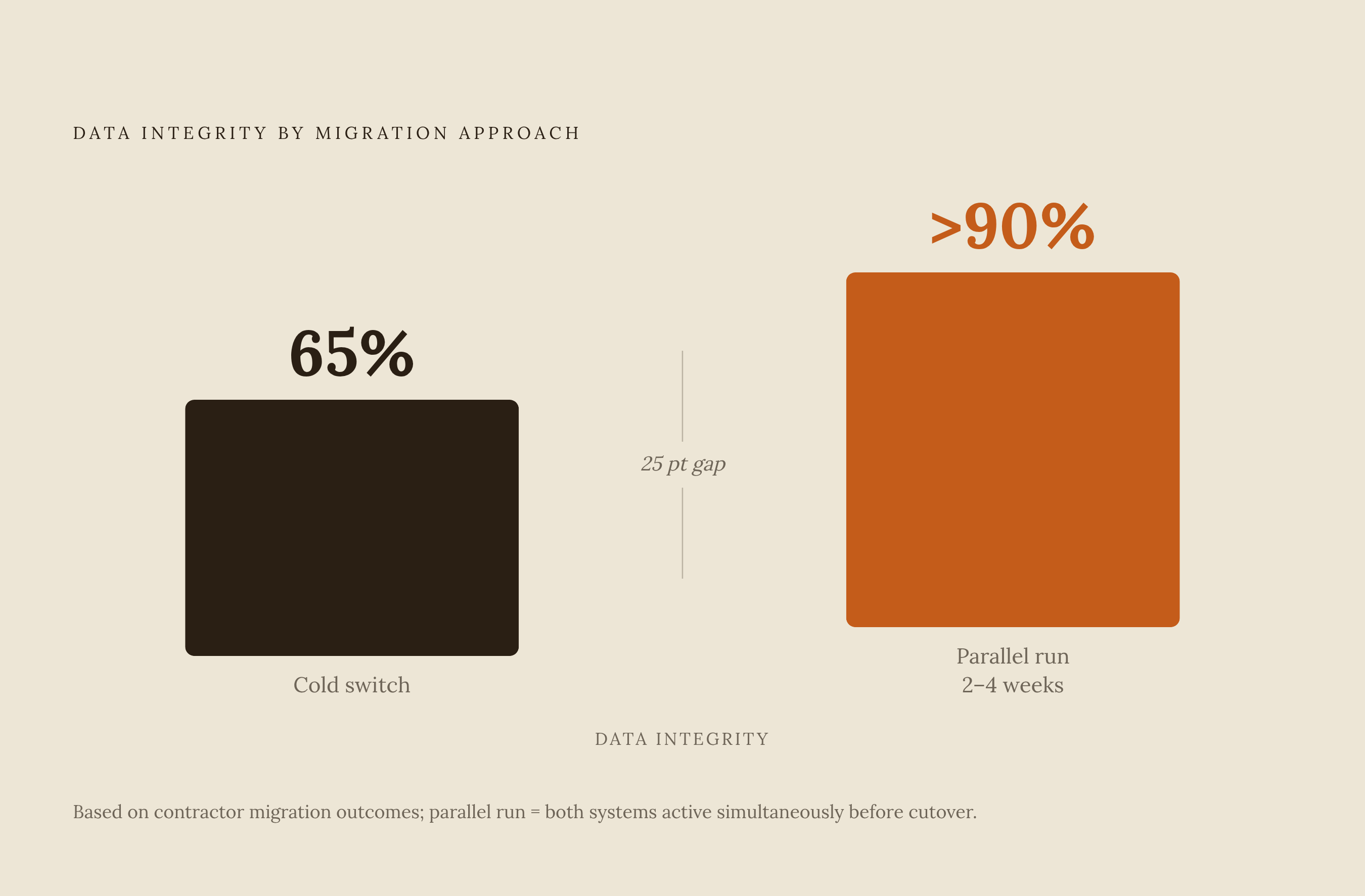
Per Software Advice's 2024 CRM migration report, cited in PipelineOn, contractors who run both systems in parallel for 2 to 4 weeks report data integrity above 90%. Contractors who do a cold switch, cancel the old system and start the new one on the same day, report closer to 65%, the gap that is the whole argument for patience. That gap is the whole argument for patience.
Parallel running has a specific shape:
New jobs and new leads get entered into the new CRM starting day one of the parallel period, no exceptions. The old CRM stays active and accessible, read-only access is fine, purely for historical reference. Nothing new gets entered into the old system during this window, which avoids a sync mess between two live databases. And any deal that was actively mid-pipeline at cutover gets logged in both systems until it closes or clearly lands in the new one for good.
Skipping this step carries real revenue risk, not just inconvenience. Every hour the CRM sits offline or locked in read-only mode during cutover is an hour reps can't log a call or update a deal stage, pipeline exposure measured in hours, not a hypothetical. That's pipeline exposure, measured in hours, not a hypothetical.
Assign one person to own a parallel-period log, even something as basic as a shared spreadsheet tracking which deals exist where, their stage in each system, and any discrepancies spotted along the way. Two to four weeks is the right window: shorter, and the team hasn't stress-tested the new system against real work yet; longer, and people start drifting back to the old system out of habit, and the whole migration stalls out.
And under no circumstance should the old system's subscription get canceled before the parallel period ends and verification passes. Canceling early is the single most common cause of data loss that can't be recovered afterward.
Verification: the specific checks that confirm the migration actually worked
A record count matching between old and new systems feels like proof the migration worked. It isn't. Verification has to happen at the field level and the relationship level, checked directly against the mapping document built earlier.
The checks that actually confirm something:
Record count reconciliation. Total contacts, companies, deals, and activities in the new system against the export totals from the old one. Pipeline stage distribution. If 12 deals sat in "Proposal Sent" before the move, 12 deals need to sit in the equivalent new stage after it. Custom field spot-check. Pull a representative sample of deal records and confirm every custom field populated correctly, paying close attention to any field that went through a type transformation during mapping. Relationship integrity. Contacts need to link to the right company. Deals need to link to the right contacts. Orphaned records appear as contacts with no company attached, or deals floating with no contact behind them, when relationship links break during migration. Activity history. Open several high-value deals directly and confirm call logs, notes, and email history are attached and readable. Attachments. Confirm proposals and signed contracts on key job records are actually accessible in the new system. Automation logic. Trigger every rebuilt workflow and sequence against a test record and confirm it fires correctly. User permissions. Log in under each user role and confirm visibility and edit access match what was intended.
If any single check fails, the response is not to cancel the old system anyway and hope for the best. Diagnose the failure, patch the data, re-run that specific check. Once everything passes, document the results in a signed-off verification log. That log protects the contractor if data questions arise later, and it gives the whole team the confidence to actually commit to the new platform instead of quietly keeping the old one open "just in case.""
The failure points contractors hit most often, and what to do at each one
Three failure patterns recur across contractor migrations, and each one has a specific fix.
Broken field mapping drops records silently. A rep goes looking for a deal, finds the record, and the fields that should be populated are blank. The cause: a custom field in the source system had no match in the target, so the migration tool either skipped it or buried it in a generic notes field. The fix is the same one covered above, validate at the field level after every test batch, not just the record count, per Patoliya Infotech (July 2026).
Duplicate records carry over from the source system. The same homeowner shows up as two or three separate contacts, and automated follow-up sequences fire multiple times at the same person. This traces straight back to skipping deduplication during the audit. The fix: run deduplication before export, matching on email, phone, or domain, since matching on name alone misses most duplicates, per Patoliya Infotech (July 2026).
Object relationships break during the move. Deals land in the new system with no contact and no company attached, floating as orphaned records. This happens when the migration ignores object hierarchy, moving contacts before their companies even exist in the target system. The fix is sequencing, enforced strictly: companies first, contacts second, deals third, activities last, per Patoliya Infotech (July 2026).
None of these three failures are exotic. They're the predictable result of skipping a step that felt optional at the time, usually because the old system needed to go and everyone wanted it gone yesterday. The contractors who avoid them aren't the ones with the fanciest new CRM. They're the ones who treated the move like the data-integrity project it always was, and gave it the four weeks it needed before touching the cancel button.