CRM Automation Rules for Contractor Follow-Up Sequences
Trigger timing and stop logic determine whether your follow-up converts leads or annoys them away.
Contractors lose close to 30% of their leads to slow follow-up, rarely a missing-tool problem. That's rarely a missing-tool problem. Most contractors already run some kind of follow-up sequence in their CRM. What kills the deal is a sequence that never fires, fires at the wrong moment, or keeps texting a homeowner who signed the contract three days ago.
Having a sequence isn't the same as having one built to convert. Triggers wired to the wrong event mean nothing starts. A missing stop condition lets the sequence run past the finish line. Single-channel setups hammer a lead with email or SMS instead of running both together. The rules underneath produce the real work: trigger logic, timing, branching, and stop conditions decide whether a sequence books the job or gets deleted without a second thought. Those decide whether a sequence books the job or gets deleted without a second thought.
The trigger rule is where conversion is won or lost
Every automation, in any CRM, runs on the same structure: trigger, condition, action. This structure applies equally to software built for construction and to software borrowed from some other industry. The trigger decides when the clock starts, and get that one choice wrong, nothing downstream matters.
For contractor follow-up, the trigger should be the estimate status changing to "sent." Not the form submission, not the site visit, not the invoice. The moment the estimate goes out is the moment the homeowner has a real number in front of them and starts deciding. Follow-up needs to start working right then, not an hour later, not after lunch.
Speed backs this up hard. InsideSales.com's Lead Response Management research found prospects contacted within five minutes convert at eight times the rate of those reached after thirty minutes. That gap doesn't shrink because a contractor is up on a roof and can't check his phone. The trigger has to fire the second the estimate leaves the system, not whenever someone remembers to update a field.
A few secondary triggers belong alongside the main one. A form submitted on the website should kick off a speed-to-lead sequence, separate from the post-estimate flow. No activity logged in X days on an open deal should trigger a stall-recovery sequence. Job completion should start the review and referral request.
The mistake most contractors make is setting the trigger to "lead created" instead of "estimate sent." That fires before the homeowner has anything to respond to, and it burns goodwill on someone who hasn't seen a price yet. After-hours timing makes this worse: Housecall Pro data shows 41% of jobs booked online come in outside normal business hours. If the trigger depends on a person clicking something, that speed advantage disappears the second the office closes.
Timing and channel logic across a five-touch sequence
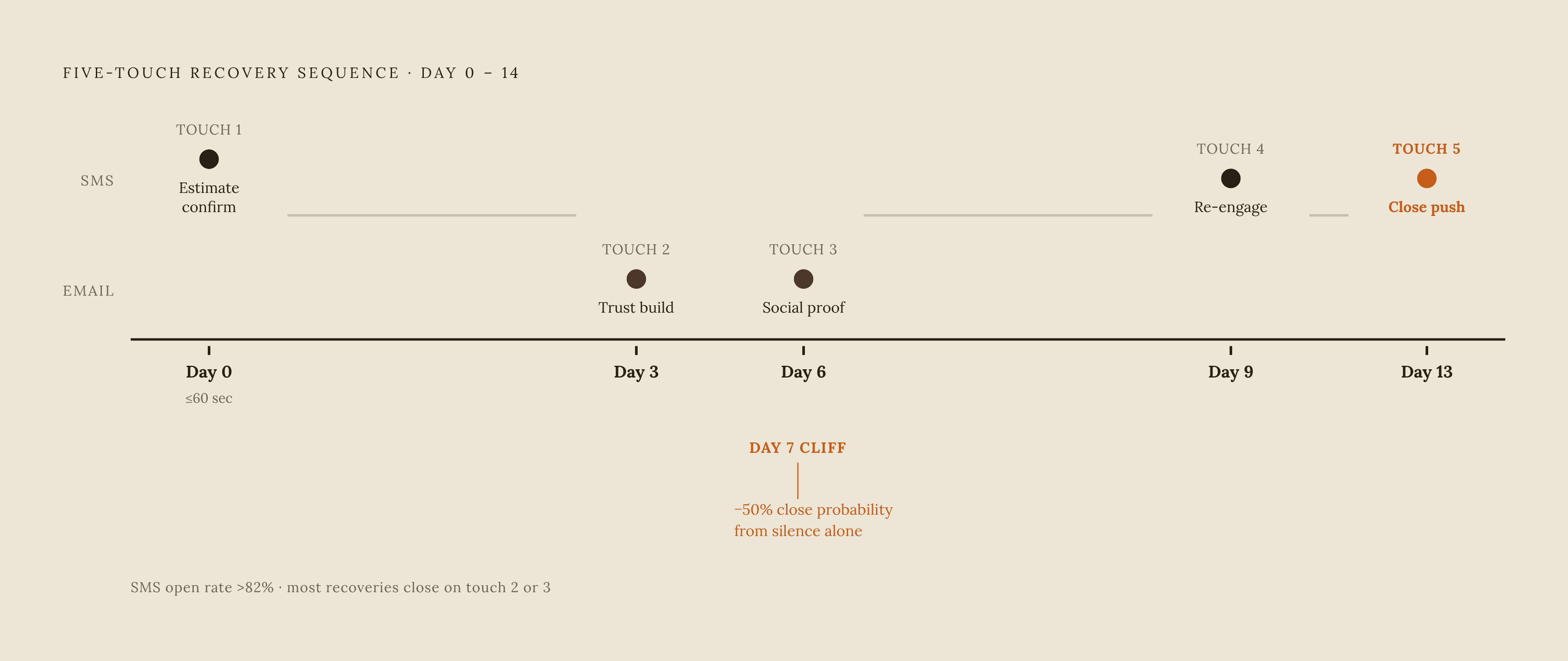
The R. Construction Solutions 2026 guide lays out a five-touch sequence spread over 10 to 14 days. There's a reason it's five, not three. Most sales need five or more follow-ups to close, yet most contractors give up after one or two tries. That gap is where leads go cold.
Touch 1 lands on Day 0: an SMS estimate confirmation, sent within 60 seconds of the trigger firing. SMS carries the early and late touches because open rates run above 82%, which makes it the right channel when speed and visibility matter most. Email does the heavier lifting in the middle of the sequence, where there's room to build trust and answer questions a text can't hold.
Most recovered jobs close on the second or third automated touch, not the first. The value of the sequence isn't just speed, it's persistence, and cutting it short costs real money. Close probability on a residential estimate drops by roughly 50% after Day 7 without contact. Half the deal, gone, from silence alone.
Stop logic gets its own section further down for good reason. A sequence that runs on schedule but never knows when to shut off does more damage than no sequence.
Stop triggers and branching conditions that keep sequences from destroying trust
A hard stop pulls a contact out of the sequence immediately, no delay, no next scheduled touch. Every sequence needs one for "accepted" and one for "declined." No exceptions.
A homeowner books the job, and two days later gets a "just checking in" text anyway. That's a trust hit big enough to matter, and trust is what referrals run on. The CRM has to watch every reply channel at once, so a response by email shuts down the SMS leg too, and the reverse has to hold as well. When that doesn't happen, the software isn't the limitation. Someone configured the automation with a gap in it.
Every contractor sequence needs, at minimum, four hard-stop conditions: estimate accepted or contract signed, estimate explicitly declined, any inbound reply on any channel, and appointment booked.
Beyond stop-or-continue, branching conditions handle the gray areas. A lead who replies with a question should pause the sequence, get a task assigned to a rep, and only resume if the rep hasn't responded within a set window. A lead who opens the email but doesn't reply should get a different message on the next touch instead of a repeat. A deal above a certain value should escalate straight to a phone call task instead of continuing down the automated SMS path.
Getting this wrong doesn't only cost the relationship. Without stop triggers, dashboards show active sequences running on deals that already closed, which pollutes the pipeline data. Once that data is wrong, forecasting turns into guessing with extra steps. And branching conditions only work if the data underneath them is clean, which is a bigger problem than most contractors realize.
Why dirty CRM data breaks automation rules
Automation doesn't fix bad data; it just moves it faster, so the result looks like progress while actually being a mess with a cleaner interface. It just moves it faster, so the result looks like progress while actually being a mess with a cleaner interface.
Three data problems break trigger logic more than anything else. Inconsistent stage names top the list: a trigger built for "Estimate Sent" won't fire if half the team logs the same step as "Quote Out" or "Pending." Duplicate contact records come next, where the same homeowner gets enrolled twice under two slightly different entries, and the sequence fires at them from both directions at once. Then there's missing or inconsistent fields: a condition check on deal value, project type, or region hits a blank field, returns null, and the lead gets skipped entirely, silently, with no error and no flag.
Generic CRMs make this worse for contractors specifically. They ship with stages built for software sales, "Discovery Call," "Demo Scheduled," "Negotiation," none of which maps to how a construction job actually moves. Contractors need stages like Lead Received, Site Visit Scheduled, Estimate Sent, and Contract Signed, and every automation rule has to reference those exact names or the trigger won't fire.
Before building a single workflow, the fields need organizing and the stage names need standardizing across every user. One afternoon spent on that cleanup saves weeks of sequences misfiring or quietly skipping leads. Data hygiene also decides how good AI personalization looks, since AI-drafted messages pull straight from CRM fields. If project type sits blank, or gets entered five different ways across the database, the message that goes out reads generic at best and wrong at worst.
A short audit catches most of this. Confirm every user and entry point names pipeline stages the same way. Confirm whether duplicate records have been merged. Check whether every active lead has a name, phone, email, project type, and estimate status filled in. Check whether every lead source, web form, and paid ad feeds straight into the CRM without someone typing it in by hand afterward.
How AI layers onto rule-based sequences
Rule-based sequences are consistent, but static. AI fills the gap: qualifying inbound leads, personalizing message content pulled from CRM fields, and picking up leads that arrive at 11 p.m. when nobody's at a desk.
The speed-to-lead numbers here are dramatic. AI-assisted scheduling has cut the average time from first contact to booked estimate from 47 minutes down to under 3 minutes. Catching a lead while they're still comparing contractors, versus catching them after they've already booked with someone else, is what separates a booked job from a lost one.
After-hours coverage is where this matters most. With 41% of online job bookings happening outside business hours, an AI receptionist or SMS bot that responds instantly catches leads a purely rule-based sequence would miss the moment its trigger depends on a human being at a desk.
On the personalization side, AI-drafted messages pull the prospect's name, project type, recent touchpoints, and CRM activity to write something that reads like it was written for that specific homeowner, not copy-pasted from a template. The rep reviews it and hits send instead of starting from a blank message box.
AI also handles qualification logic inside the sequence itself: sorting an inbound inquiry into emergency, routine, or estimate-only before it even gets enrolled, routing high-value leads straight to a phone call task instead of the automated SMS path, and booking appointments directly onto the calendar with no human touch needed.
Industry research found contractors using AI-powered automation close two to three times more jobs while saving over ten hours a week. Most contractors reading this are deciding how far to take AI, not whether to adopt it at this point. They're deciding how far to take it.
Platforms that give contractors these automation rules without requiring a second tool
The best setup keeps follow-up automation, estimating, scheduling, and invoicing in one system. Every extra tool bolted on through Zapier is another place the connection can break, another sync delay, another thing to troubleshoot at 6 a.m. before the crew shows up. Stacking tools might feel flexible, but it trades reliability for the illusion of choice, and for a five-person crew that illusion gets expensive fast.
QuoteIQ published its own ranking of ten platforms in July 2026, authored by the company's co-founder, so QuoteIQ landing at #1 on its own list should be read with that in mind.
QuoteIQ runs from $29.99/month (Essentials) up to $699/month (Max). Post-quote, post-job, and review sequences run natively through Email & Text Automation and Review Multiplier, available on Pro tier and above. Estimating, scheduling, invoicing, and follow-up automation live in one app, no Zapier required.
Jobber starts at $29/month billed annually, up to $199/month. Automated quote follow-ups are available on higher-tier plans. Strong for small teams wanting a clean interface.
Housecall Pro starts at $59/month, with automated reminders plus CSR AI handling inbound calls and chat. A good fit for fast setup and contractors offering consumer financing.
ServiceTitan runs on custom pricing, with contractor community estimates landing around $245 to $500 per technician per month. The Marketing Pro automation suite is a paid add-on, not part of the base contract. Built for enterprise operations with 20 or more technicians, and multiple G2 reviewers in 2025 and 2026 describe it as heavy and expensive for contractors running teams of 1 to 20.
Workiz starts at $225/month, with built-in VoIP and automated SMS flows. Suited to phone-heavy contractors who want call tracking alongside their sequences.
GoHighLevel starts at $97/month, with deep multi-step automation. Good for marketing-focused contractors, though field service work needs an add-on like FieldTask from the GHL Marketplace.
JobNimbus runs on custom pricing, with visual workflow automation aimed at roofing contractors. AccuLynx tends to be the stronger pick for insurance claims-heavy operations.
Buildertrend runs on custom pricing, with a client portal and proposal follow-up built for residential builders and remodelers.
Service Fusion uses tiered flat-rate pricing from roughly $245/month (Starter) to $627/month (Pro), with unlimited users and a drag-and-drop dispatch board. Best fit for mid-sized single-trade businesses in HVAC, plumbing, or electrical with 10 or more technicians.
HubSpot CRM offers a free tier, then $15 per seat per month at the Starter tier. Email sequences exist at that level, but full automation only unlocks at the Professional tier. A reasonable pick for budget-conscious solo operators.
The right platform depends on team size, native automation versus tolerance for a few integrations, and how much pricing transparency matters going in. Feature lists alone won't settle that. But across every platform on this list, the one feature that decides the most outcomes is automated quote follow-up at the 48-hour mark, the single touchpoint that recovers the most jobs from estimates that got sent and then went quiet.
The metrics that tell you whether your rules are working
Automation without measurement drifts. The rules might have been right the day they were built, but leads behave differently as seasons change, as project types shift, as the market moves. A sequence set up in March doesn't automatically still make sense in October.
Check every sequence against four numbers. Lead response time, the average time from trigger to first automated touch, should sit under five minutes; if it doesn't, the trigger is misconfigured or the platform itself has a lag worth investigating. Sequence completion rate, the share of enrolled leads that reach Touch 5 without a stop condition firing, tells a different story: too high, and stop triggers are probably missing somewhere; too low, and someone on the team is overriding the sequence by hand more than they should.
Touch-by-touch reply rate shows which specific message in the sequence pulls the most responses, and that's the data point that shows where the sequence earns attention and where a message needs a rewrite. Estimate close rate by sequence enrollment checks leads who went through all five touches against leads who dropped out early. That's the number that proves whether the sequence actually drives the close, or just rides along with leads who were going to say yes anyway.
Contractors running follow-up automation close 40% to 60% of estimates, against 15% to 20% for manual follow-up. That gap doesn't hold on its own. It holds because someone checks these four numbers regularly and adjusts the trigger, the timing, or the message when the data says to.