Call Tracking Setup for Contractor Multi-Channel Attribution
Phone calls are the highest-converting contractor leads, so attribution must track them.
A contractor looks at the dashboard, sees that branded search barely converts, and cuts the budget. Three months later, call volume across the whole business is down, and nobody can say why. The real cause sat upstream the whole time: that branded search campaign was the first touch for homeowners who later called in weeks later, and the attribution system never connected the two. Phone calls are where most contractor leads arrive, and when a measurement system can't account for them, it's measuring a fraction of what's actually happening. Marketing math built on top of that gap produces wrong answers no matter how clean the spreadsheet looks.
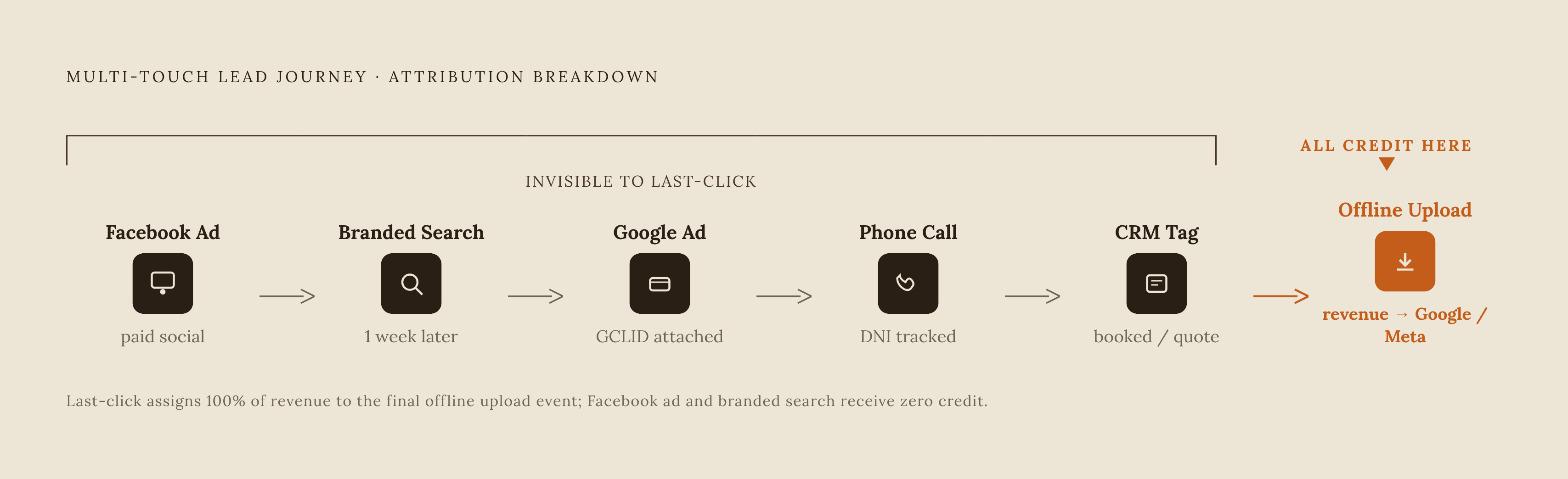
Phone leads in home services convert at a far higher rate than web form submissions. The leads most worth tracking carefully are exactly the ones most setups fail to track. On top of that, customers don't book after one touchpoint. They see a Facebook ad, search the brand name a week later, click a Google ad, and then call. A CRM that only credits the final form fill or the final call is throwing away everything that happened before it, which is most of the actual buying journey.
Last-click attribution is the default when nothing else is in place, and it systematically rewards the channels that show up last, usually branded search and retargeting, while starving the channels that started the journey. Every budget decision made on top of that data points in the wrong direction. By the time the budget numbers reflect it, the original cut is hard to trace back. This is a measurement infrastructure problem, not a question of better math or smarter dashboards. Fix the measurement, and the budget decisions start making sense again.
What dynamic number insertion does and why it has to come first
Dynamic number insertion, or DNI, is the mechanism that makes any of this traceable. It swaps the phone number a visitor sees on the website based on where that visitor came from, so a specific call can be tied back to a specific channel.
The mechanics are straightforward. A JavaScript snippet runs on the website and detects which source drove that visitor's session, whether that's a Google Ads click, an organic search result, or a referral from Facebook. The snippet then swaps in a phone number unique to that source. When the visitor calls, the number they dialed tells the system exactly where they came from.
Pushed down to the keyword level, this gets specific fast. A contractor can see that a call came in from someone who searched "emergency furnace repair near me," as opposed to someone who searched "best HVAC company" plus their city name, instead of just knowing both calls came from Google Ads in general. That distinction changes how a contractor bids on and budgets for each term.
Setup has to happen in a specific order. Install the DNI snippet across the entire site first. Then assign tracking numbers to every channel being measured, before touching any other configuration. Skip the numbers, and no call data flows anywhere, no matter how well the snippet itself is installed.
Coverage matters as much as sequence. Numbers need to be purchased for every active channel: Google Ads, Local Service Ads, organic search, Facebook, Nextdoor, direct mail, and each separate offline asset type. Sharing one number across multiple channels defeats the entire point, because the moment two sources point to the same number, there's no way to tell them apart on the call log.
Offline channels work differently. Because a static number can't isolate every variable the way DNI can, contractors running heavy offline campaigns should also watch for lift in branded search and lean on self-reported surveys asking new customers how they heard about the business.
Structuring source tagging to carry a lead's origin through the funnel
DNI solves attribution for phone calls, but web forms and site sessions need a parallel system: UTM parameters and GCLID capture. Most contractor websites are leaking this data somewhere in the form setup, often without anyone noticing.
When a homeowner clicks a Google ad, the resulting URL carries a GCLID parameter attached to it. When they click a link from a tagged campaign, say an email blast or a Facebook post, the URL carries UTM values instead. These parameters are what tie a job, once it closes, back to the specific ad or campaign that started it.
Form software routinely drops the source data at the point of submission. The source data is sitting right there in the URL, but it never makes it into the lead record, so by the time someone in the office looks at that lead, the trail is gone.
Fixing this takes a few pieces working together. UTM values then need to pass through as hidden fields into the CRM, so the source data survives the form submission itself and stays attached to that lead record all the way through quoting and job close.
But the leads that do come through a form tend to be further along, higher-consideration prospects researching more carefully before reaching out, so losing their source data costs more than the raw volume would suggest.
Consistency across channels is what holds the whole system together. Google Ads handles GCLID tagging automatically. Meta, email, and direct campaigns need UTM tags applied by hand. Any gap in that consistency doesn't just lose one lead's data; it appears in reporting as phantom "organic traffic," because the system has nowhere else to file a lead whose source tag never got set.
Connecting call tracking to your CRM so source data reaches the job record
Call tracking data sitting inside a call tracking platform, by itself, is only half the picture. The source of a call becomes genuinely useful only once it's attached to that lead's record in the CRM, next to what actually happened with the job.
Outcome tagging is the step most contractors skip, and it's the one that makes everything upstream meaningful. Every call needs to get classified somewhere, whether in the call tracking platform or the CRM: booked, quote sent, spam, existing customer calling back. Without that tag, the data only shows how many calls came in, not how many turned into revenue. A campaign throwing off a high volume of calls looks great in a raw report, right up until outcome tagging reveals that most of those calls were spam or existing customers, not new business.
Convirza's home services platform shows what this connection can do beyond just recording data. At that point the CRM connection moves past passive record-keeping and starts doing work on its own.
After-hours calls are a large, mostly untapped slice of bookable demand. Plenty of systems log these calls and then do nothing with them. Connecting call tracking to an automated follow-up layer, whether that's SMS, email, or an AI response tool, recovers leads at this stage that would otherwise just vanish from the funnel with no record anyone ever tried to reach them back.
Sending offline conversion data back to Google Ads and Meta so the platforms bid on jobs, not calls
Without offline conversion imports, Google Ads and Meta keep optimizing toward calls and form fills, not toward the jobs that actually close. Plenty of those calls and form fills never turn into revenue, so the platforms end up spending money finding more leads that look the same on paper but don't pay the bills.
The mechanism on the Google Ads side starts with that GCLID parameter mentioned earlier. When someone clicks an ad, Google attaches a GCLID to the landing page URL. That GCLID has to be captured on the landing page, stored on the lead record inside the CRM, and then uploaded back to Google Ads once the job closes, with the actual revenue value attached to it.
That upload is what tells Google's bidding algorithm which clicks produced real revenue. Without it, Google has no way to distinguish a click that led to a high-value job from one that led to a dead-end call. With it, the algorithm starts shifting spend toward the audience segments and keyword patterns that close jobs, rather than the ones that just generate activity.
Timing matters here too. A weekly or bi-weekly upload process, tied to deal-stage changes inside the CRM, is the practical way to handle that lag.
One more piece is moving right now and needs attention. Google is folding the standalone Local Service Ads dashboard into the main Google Ads platform, rebuilding it as specialized Performance Max campaigns built around a pay-per-lead goal. Phase 1 of that migration started in August 2026 for home and storefront service advertisers, covering plumbing, HVAC, electrical, appliance repair, house cleaning, lawn care, roofing, pest control, and moving services. Contractors running LSAs need to check that their offline conversion setup still works once that migration reaches their account, because a setup that was tracking correctly under the old dashboard isn't guaranteed to carry over cleanly.
Every step covered so far, the DNI numbers, the outcome tags in the CRM, exists to make this import possible. DNI identifies the call. The CRM tags what the call turned into. The offline conversion import tells Google and Meta what actually closed. Skip this last step, and the earlier work never reaches the place where it changes how money gets spent.
Choosing a call tracking platform at each revenue stage
The right platform depends on what the business needs the data to actually do, and that changes as revenue grows. A contractor just getting started needs basic call-source attribution. A larger operation needs full multi-channel lead qualification. A company running a mature CRM stack needs revenue reporting built natively into that CRM. Each stage calls for different tools.
It holds the number-one position for Results in call tracking and attribution on G2, and it's a strong entry point for operators working with a tight budget.
CallRail fits a similar stage but with a different strength. Its real differentiator is conversation intelligence: AI transcription and call scoring that go beyond simple source attribution. That makes it the common choice for independent home service businesses that want more than just a number on where a call came from.
As a business scales into needing deeper phone workflow management, the choice usually comes down to CallRail Complete or WhatConverts Elite. The deciding factor isn't price so much as what kind of complexity the business is managing: more complex call routing scenarios point toward CallRail's phone workflow tools, while a business mainly needing source attribution and lead qualification can stay with WhatConverts.
ServiceTitan Marketing Pro takes a different approach entirely: it builds attribution directly into the CRM, so there's no separate call tracking subscription to manage. That convenience comes with a tradeoff, since it ties the business more tightly to the ServiceTitan platform.
Ruler Analytics works alongside a CRM rather than replacing it, tying every lead back to revenue across channels. It fits businesses running a mixed CRM and ad stack that want attribution layered on top of what they already have.
Whatever platform gets chosen, a few checks apply across every tier. Ask for the full cost up front, including the subscription, the phone numbers, minutes used, conversation intelligence features, and implementation. Confirm, in writing, who owns the phone numbers and what the transfer process looks like if the business ever switches providers. Before going live, place test calls from the website, from an ad landing page, and from an offline campaign number, and check that call forwarding, recording settings, source labels, and the record the office actually uses to book work all line up correctly.
What conversation intelligence adds to a working attribution layer
Once source attribution is actually working, conversation intelligence turns each call record from a single data point into something closer to a coaching tool, one that can surface mishandled calls and missed bookings without anyone needing to sit through hundreds of recordings a month.
Traditional call tracking answers a narrower question: which channel produced this call. Conversation intelligence answers a different one: what got said on that call, whether it turned into a booking, and why it did or didn't. Those are two different problems, and solving the first one doesn't automatically solve the second.
Convirza's Conversation Analytics engine transcribes calls and scores them against a set of booking criteria: whether the CSR asked for the appointment, whether same-day availability got offered, whether pricing was quoted, whether financing came up, whether callback information got collected. Scored this way, the data becomes something that can be queried across thousands of calls a month, rather than something that only makes sense one call at a time.
AI transcription and call scoring, available through CallRail's Lead Conversion plan and through Convirza, flags calls where a booking likely got missed. Some flags will be wrong, and the scoring still leaves room for judgment.
The same instrumentation makes location-level performance visible in a way it otherwise isn't. Which offices answer the phone fastest, which CSRs close the most appointments, where call routing is quietly failing: none of that is measurable without conversation data behind it. Without it, a gap between the best-performing location and the worst-performing one gets felt in the numbers at the end of the month, but nobody can point to the specific call or the specific habit causing it.
After-hours calls are where this pays off most directly. A substantial share of bookable demand in home services arrives outside normal business hours, and conversation intelligence is what identifies those missed calls and triggers automated SMS or email follow-up while the lead is still warm. A call that would otherwise sit in a log, unanswered and unreturned, becomes a lead someone can still recover.