CRM and Marketing Platform Integration Requirements for Contractors
Closing the gaps between lead capture, quoting, and booking prevents jobs from going cold.
CRM and marketing platform integration requirements for hardscaping contractors come down to whether an inquiry can become signed work without getting stuck between tools. The priority is a dependable path from lead capture through quoting, follow-up, and booking, with no handoff left waiting for someone to remember it.
Why hardscaping contractors lose jobs before the first site visit
An estimate request comes in at 2pm while the contractor is on a job site. It gets seen at 7pm, and by morning the homeowner has awarded the work to someone else. The contractor did not decide to ignore it. The request simply arrived in a place that needed someone to check it, then act on it. By the time that happened, another contractor had answered.
That delay is a revenue problem before it is a software problem. Web forms, calls, and social messages come in while contractors and office staff are busy with work already underway. Without automatic capture and a connected response process, those inquiries wait. Then the same risk returns when a quote moves into a spreadsheet and a follow-up depends on a manual text. Each handoff gives the job another chance to go cold before anyone visits the property.
What "integration" actually means in a contractor's day
Integration means the details a homeowner gives at first contact show up where they are needed next, without anyone typing them again. The sequence is short, beginning with a captured lead and a contact record, then moving through a quote, a scheduled follow-up, and a booked job. A connected process carries the information through those steps. A fragmented process makes a person carry it. Every boundary between tools becomes a place where details can be delayed, duplicated, or lost.
For hardscaping, those details include more than a name and phone number. Square footage, surface type, site access, and existing grade affect the work that goes into the quote. A contact record that holds the conversation but cannot pass the property details into estimating leaves a gap in the process. The estimating tool needs those details to get the quote right.
The typical fragmented setup has three parts, namely a way to capture leads, a way to build estimates, and a way to communicate. That might mean a web form, a spreadsheet, and texts from a personal phone or emails from Gmail. Each tool can do its own job without passing the work to the next one. ServiceTitan's construction CRM guide identifies another break at “Closed Won,” where most general-purpose CRMs stop and contractors must manually create projects in separate systems.
The integrations that directly determine whether a lead converts
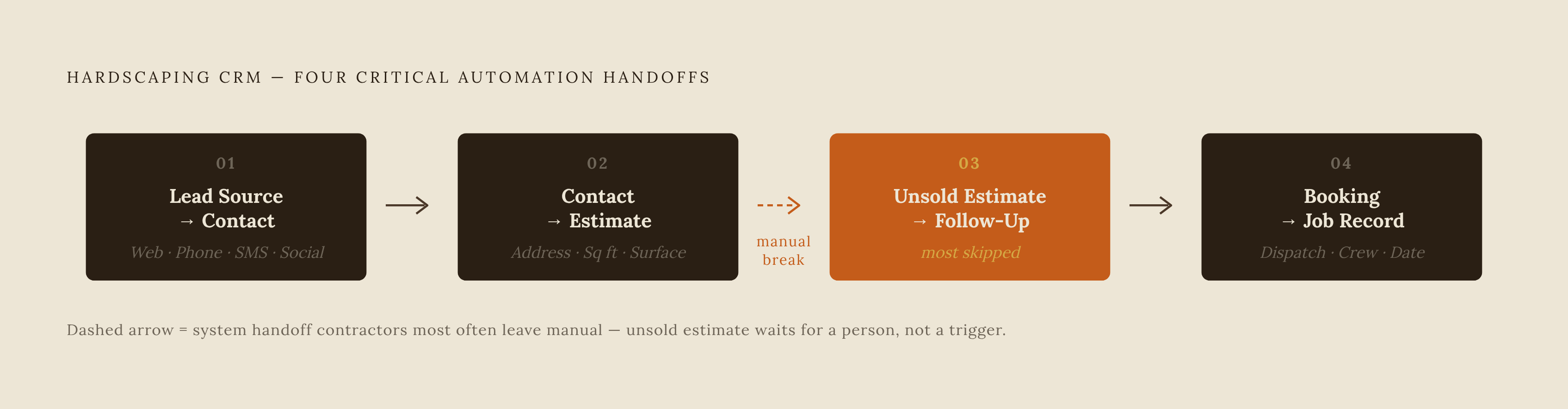
The first non-negotiable connection is lead source to contact record. Web forms, phone calls, SMS, and social media messages must put the customer's details into a single contact record automatically. If an inquiry sits in one inbox until someone types it into another tool, the reply has to wait for that person. ServiceTitan's CRM overview identifies untimely correspondence and an inability to use customers' preferred channels as core workflow problems. For hardscaping homeowners who reach out through Instagram or Facebook after seeing a completed project, social-to-CRM capture belongs in the core process.
The second connection is contact record to estimating. Information must move from the inquiry into the quote, with the system pulling or prompting for the address, square footage, and surface type needed to begin. That lets the contractor offer a ballpark estimate during or immediately after first contact rather than waiting for another exchange to start pricing. The distinction matters because a homeowner who is waiting for a quote has time to book someone else. ServiceTitan's construction CRM guide describes project-based CRMs that keep estimates attached to the same job record as the scope changes, allowing winning work to become an active project without a manual handoff.
The third connection is estimate status to follow-up trigger. Here, information flows from the open, unsold estimate into outbound communication. After a reasonable window, the system should automatically trigger a follow-up because the quote remains unaccepted. ServiceTitan's CRM overview describes the Follow-Ups tab, also called the Follow Up screen, as a way to track unsold estimates and open opportunities so staff can re-engage customers. That tracking addresses the right problem, but the critical requirement is that estimate status drives action. If estimating and messaging remain separate, every follow-up still depends on a person inspecting one tool and acting in another.
The fourth connection is booking to job record. A homeowner's acceptance should carry the agreed details into a scheduled job without re-entry, a separate calendar event, or another call to establish what was already agreed in writing. ServiceTitan's CRM overview describes scheduling software that brings the calendar, the times when field workers are free, and new job requests into one place. For hardscaping projects that span multiple days and need crew coordination, that connection is part of delivering what was sold. A booking that does not populate the dispatch board leaves room for scheduling errors before work begins. These four connections deserve priority because they carry the customer from initial interest into committed work.
Where fragmented stacks break down at the worst possible moment
Manual handoffs are hardest to keep up with when demand is highest. During the spring rush, a contractor running three jobs at once still has to check a separate inbox, build estimates in a spreadsheet, and send texts from a personal phone. As a result, inquiries can pile up unanswered even though the contractor wants the work.
After-hours inquiries expose the same gap without the daytime workload. A homeowner fills out a form at 8pm on Friday after seeing a neighbor's new patio. If that form only feeds a Gmail inbox that goes unchecked until morning, it leaves a high-intent inquiry waiting while the homeowner contacts another contractor. ServiceTitan's CRM overview describes a Web Scheduler or Chat to Text widget that lets customers schedule or start text conversations outside business hours. The important connection is from the homeowner's action into the next step, rather than into an inbox that cannot move the conversation forward on its own.
The cost can also extend beyond the immediate job. A missed customer is a lost opportunity for referrals, reviews, and later hardscaping phases. Even when the contractor wins and completes the work, a disconnected process can miss the next handoff. A manual review request depends on someone remembering it after the work is done. The same manual gap that delayed the first reply can therefore leave a completed job without a follow-up request at the moment the customer is most satisfied.
The integrations that matter less than vendors imply
Other integrations have real value, but they solve different problems. Accounting software sync, including QuickBooks, helps with bookkeeping and getting taxes ready after the job has already been won or lost. Social media management tools help schedule posts and track engagement, but they do not fix the breaks in the quoting process. Capturing an incoming social message is a conversion requirement. Scheduling an outgoing post is a different task, and treating the two as interchangeable blurs the priority.
Advanced reporting dashboards can also help, especially as the business grows. But for a contractor running under five crews, visibility into pipeline metrics does not replace the connections needed to win more work. Broad marketing automation, including newsletters and mass campaigns to past customers, can bring in repeat and referral business over time. Those activities should come after the core lead-to-close process is working.
How platform type — unified vs. assembled stack, affects integration reliability
Once the essential connections are clear, the next question is who keeps them working. Separate tools may connect successfully at first and still break when one updates, a webhook fails, or a subscription tier changes. A connection that fails silently can interrupt the flow of jobs before anyone notices. Keeping these connections working is part of what integration requires.
An assembled stack uses separate tools for CRM, estimating, and messaging, joined through something such as Zapier or manual exports. That setup puts the maintenance burden on the contractor or office manager. A unified platform keeps lead capture, contact records, estimates, follow-up triggers, and booking within the same system. It therefore removes the separate connections the contractor would otherwise have to maintain between those steps.
ServiceTitan's construction CRM guide describes the project-based CRM advantage as a direct link between CRM and project and business management workflows. With those workflows connected, pipeline data reflects real backlog rather than sales activity tracked in a separate tool. The notes' franchise advantage works the same way: unified systems link the steps of the work, and small independents can get that link through trade-specific software. But a single system still needs a real evaluation of how well it handles every non-negotiable step. A unified platform removes the need to maintain separate connections only if the required workflow actually works inside it, including capable estimating, reliable follow-up, and correct scheduling.
What to look for when evaluating a CRM and marketing platform as a hardscaping contractor
Start by filling out a web form, sending an SMS, and calling the demo number. Check that each makes a contact record automatically, without anyone typing in the details afterward. For social inquiries, evaluate the same source-to-record connection that makes the other channels useful.
Next, follow the property information into estimating. Confirm that the platform can pull address or satellite data to support a rough estimate before a site visit. Check how the quoting flow handles square footage and surface type. For hardscaping, this is the distinction between supporting a same-day quote and waiting through a multi-day delay. A rough estimate does not erase the physical details of the site, but the system should not force every pricing step to wait until the visit.
Then send a test estimate and leave it unaccepted. Verify that the system triggers a follow-up at a defined interval without a person initiating it. An unsold-estimate screen alone does not pass this test if someone still has to start every message. After that, accept a test quote and check the dispatch board. The scheduled job should have the right crew, date, and property details without re-entry, so accepting the quote puts what was agreed into the work schedule.
Complete a test job and check that a review request fires automatically on completion or payment, routed to Google Business Profile. Then check the pricing structure for the features that make these connections work, including automated follow-up, multi-channel lead capture, and review automation. Confirm whether they are included in the base plan or require add-on tiers that raise the real cost of the stack. Those checks turn an appealing demo into a test of the process the business will depend on.